Creating audio content used to require microphones, voice actors, and editing software. Today, text to speech technology has completely changed that process.
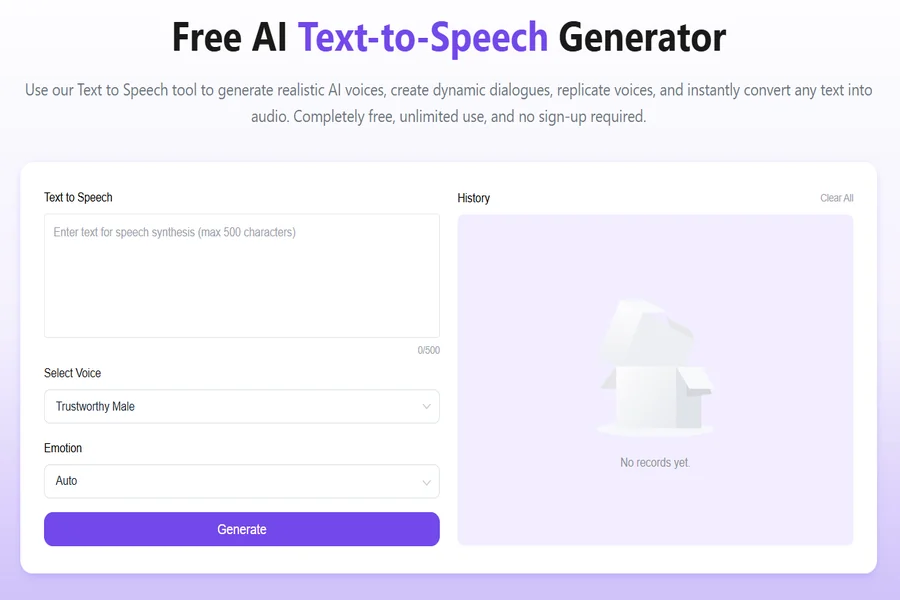
With tools like Text to Speech, anyone can turn written content into natural-sounding audio in just a few clicks. You simply input text, choose a voice, and generate a ready-to-use audio file—no recording needed.
This shift is making content creation faster, more accessible, and far more scalable.
What Is Text to Speech and Why It Matters
Text to speech (TTS) is a technology that converts written text into spoken audio using AI-generated voices. Unlike traditional voice recording, it removes the need for human narration while still producing clear and expressive output.
Modern text to speech tools go far beyond robotic voices. They now offer:
- Natural pronunciation and pacing
- Multiple voice styles and accents
- Consistent tone across long content
- Fast audio generation
This makes text to speech especially useful for creators who need high-quality audio without complex production workflows.
Key Benefits of Text to Speech
1. Speed and Efficiency
Instead of recording and editing manually, text to speech allows you to generate audio instantly. This is ideal for:
- YouTube videos
- Podcasts
- Audiobooks
- E-learning content
2. Cost Reduction
Hiring voice actors can be expensive, especially for large-scale projects.
With text to speech, you can produce unlimited audio at a fraction of the cost.
3. Scalability
Need content in multiple voices or formats?
Text to speech tools make it easy to generate variations quickly.
4. Accessibility
Adding audio to written content improves accessibility for users who prefer listening over reading.
This is especially valuable for education and global audiences.
Beyond Audio: Adding Lip Sync to Text to Speech
One of the most exciting advancements in text to speech is its integration with lip-sync technology.
Instead of generating standalone audio, some platforms now allow you to create audio that matches mouth movements in video. This means you can:
- Turn scripts into talking avatars
- Sync narration with on-screen characters
- Create more engaging video content
This combination of text to speech and lip sync opens up entirely new creative possibilities, especially for social media and marketing.
How to Use Text to Speech (Step-by-Step)
Using text to speech is straightforward, even for beginners. Here’s a typical workflow:
Step 1: Input Your Text
Paste or type the content you want to convert into audio.
This can be a script, blog post, dialogue, or narration.
Step 2: Choose a Voice
Select from available voice options, such as:
- Male or female voices
- Different accents
- Various tones (formal, casual, energetic)
Choosing the right voice is important for matching your content style.
Step 3: Adjust and Preview
Before generating the final output, you can:
- Edit wording for clarity
- Adjust pacing or tone
- Preview how the audio sounds
This ensures your text to speech output feels natural and polished.
Step 4: Generate Audio
Click generate to produce the audio file.
The system processes your input and converts it into high-quality speech.
Step 5: Download or Integrate
Download the audio or use it directly in your projects, such as:
- Videos
- Presentations
- Apps
If lip sync is supported, you can also pair the audio with visuals for a complete experience.
Text to Speech vs Traditional Voice Recording
| Feature | Traditional Recording | Text to Speech |
| Setup | Complex | Simple |
| Cost | High | Low |
| Speed | Slow | Instant |
| Editing | Manual | Easy |
| Scalability | Limited | High |
This comparison highlights why text to speech is quickly becoming the preferred choice for modern creators.
Best Use Cases for Text to Speech
Text to speech is widely used across different industries:
Content Creation
YouTubers and social media creators use text to speech to generate narration quickly without recording.
E-Learning
Educators convert lessons into audio to improve accessibility and engagement.
Marketing
Brands create voiceovers for ads, product demos, and promotional videos.
Audiobooks and Podcasts
Writers can turn written content into audio formats with minimal effort.
Apps and Digital Products
Developers integrate text to speech tools into apps for voice features and accessibility.
Tips for Better Text to Speech Results
To get the most out of text to speech, consider these best practices:
- Use clear and simple sentences
- Add punctuation to control pacing
- Break long paragraphs into smaller sections
- Choose a voice that matches your audience
- Always preview before exporting
Small adjustments can significantly improve the quality of your final output.
The Future of Text to Speech
As AI continues to evolve, text to speech is becoming more realistic and versatile. Voices are more human-like, and integration with video (like lip sync) is making content more dynamic.
In the near future, we can expect:
- More expressive voice control
- Better emotional tone matching
- Seamless integration with video creation tools
- Real-time audio generation
This will further solidify text to speech as a core tool in digital content creation.
Conclusion
The way we create audio is changing rapidly.
What once required time, money, and technical skills can now be done in minutes.
Text to speech is not just a convenience—it’s a powerful tool for scaling content, improving accessibility, and enhancing creativity.
If you’re looking for a fast and efficient way to generate audio, try the free text to speech tool and start turning your ideas into voice instantly.