

Access to applications is no longer a luxury; it is a must for both professional and personal life. Apps power practically every aspect of everyday life, from communication to banking, exercise, and entertainment. Losing access may cause major disruptions, whether you miss an important business meeting, forget to make a payment, or are unable to contact loved ones. Users frequently ignore simple techniques that might help avoid these scenarios. To minimize unexpected disruptions, prioritize upgrades, backups, and secure login methods. Ensuring ongoing access to your apps means conserving your time, increasing productivity, and providing a more seamless digital experience each day.
Why Is It Important to Always Have App Access?
The Role of Apps in Daily Productivity
Apps simplify and streamline key processes, making them crucial for personal and professional productivity. People rely on them to manage their calendars, collaborate on projects, purchase online, and communicate with friends and coworkers. Productivity software may save hours of manual effort by automating repetitive tasks, whilst communication tools keep distant teams in sync in real time. Mobile banking apps allow for rapid payments and transfers without the need to visit a physical branch. Even modest lifestyle applications like reminders and note-taking platforms help to increase productivity. Without constant connectivity, these everyday chores become more challenging, causing delays and significantly lowering overall output.
Risks of Losing Access to Essential Apps
Losing access to applications can cause more than just annoyance; it can have serious consequences. Consider getting locked out of an email app before a key client call, or losing access to cloud storage when data is urgently needed. Many applications save personal information, and account hacks or forgotten passwords may totally shut users out. If you rely on subscription services, payment problems might cause apps to cease operating unexpectedly. Business downtime caused by unavailable applications frequently results in missed deadlines, dissatisfied customers, and lost income. The hazards demonstrate why preventive actions are critical for app dependability.
Benefits of Proactive Access Management
Taking preemptive efforts to safeguard app access guarantees you’re ready for unanticipated disruptions. Planned upgrades and backups secure data while avoiding downtime. Secure login methods not only prevent account hacks, but they also lessen the likelihood of getting locked out due to unauthorized behavior. Multi-device sync allows you to continue working or communicating even if one device fails. Proactive access control also saves time because you don’t have to solve issues under pressure. Finally, it gives peace of mind, allowing you to focus on critical work rather than worrying about technological disruptions that could have been avoided.
How Can You Prevent Losing Access to Apps?
Keep Apps Updated Regularly
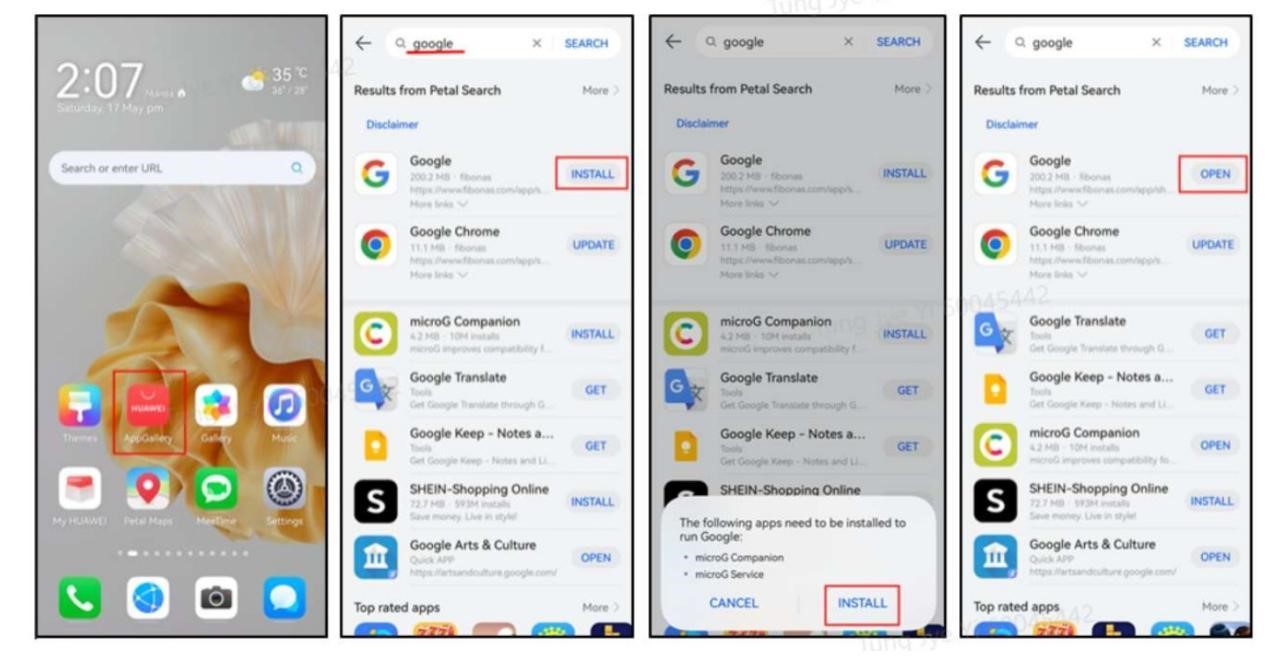
Regular updates ensure that apps remain stable, secure, and fully functional. Developers make updates not simply to introduce new features, but also to address security problems and bugs. Skipping these updates exposes your apps to crashes, data leaks, and compatibility issues with your device. Many programs provide automatic updates, ensuring that you always use the most recent version without effort. For critical apps like banking, cloud storage, or communication tools, including those accessed through huawei google services, enabling auto-update is highly recommended. By keeping apps current, you prevent unexpected errors, improve performance, and reduce the risk of downtime, giving you reliable access whenever you need these digital tools.
Enable Multi-Device Sync and Backups
Syncing apps across numerous devices means that you are never stuck if one of them breaks or is lost. Most popular programs now enable cloud backups, which automatically preserve your data and settings for speedy recovery. For example, notes stored on your phone will surface instantaneously on your laptop or tablet, allowing you to stay productive across devices. Backup tools also safeguard against unintentional deletions and software faults, allowing you to restore essential information in minutes. Cloud sync enables smooth switching between devices while preserving access to the same version of the software. This structure prevents disruptions and ensures that you always have a backup plan in place.
Secure Your Accounts with Strong Authentication
A good security approach protects both app access and data. Begin by setting unique, difficult passwords rather than utilizing the same one for different programs. Two-factor authentication (2FA) adds an extra layer of security, guaranteeing that only you can log in, even if your password is stolen. Many apps now offer biometric identification, such as fingerprint or facial recognition, which is both safe and easy. Using a reputable password manager can also help you keep track of credentials securely. By properly safeguarding your accounts, you may avoid unwanted access and getting locked out unexpectedly.
Conclusion
Uninterrupted app access is critical for productivity and ease in everyday life. Whether you’re managing job assignments, communicating with colleagues, or handling finances, apps are essential for making chores efficient and accessible. By keeping them up to date, synchronizing across devices, and safeguarding logins with robust authentication, you dramatically lower the danger of losing access. These proactive behaviors safeguard your time, information, and peace of mind. Rather than responding to issues as they arise, you may stay one step ahead. With consistent access to critical apps, you maintain control and ensure that your digital routine runs smoothly every day.

