

AI writes fast, and the speed shows. Every draft arrives clean and complete, and every draft reads the same way: confident, flat, and from nobody in particular.
We have worked with enough AI-generated content to know the pattern on sight. In this article, we show you exactly what creates that mechanical tone, why detectors catch it so reliably, and how we use a free AI humanizer to turn lifeless output into something worth publication.
Why AI Writing Sounds Unnatural
AI language models predict words. Each sentence is the statistically most likely continuation of the one before it. The output is grammatically correct and structurally sound, and it sounds like it was written by no one, because no one made any actual decisions about it.
Three patterns give AI text away faster than any other signal:
1.Flat sentence rhythm. Every sentence runs at roughly the same length. Real writers speed up, slow down, cut short, run long. AI does not.
2.Stock transitions. “Moreover,” “in addition,” “as a result,” and “in conclusion” appear at high frequency in AI output because they dominate the training data. Detectors weigh them heavily.
3. No emotional micro-cues. Human writers hedge, react, and editorialize. AI produces none of that unless you specifically prompt for it.
There is a fourth pattern that most guides skip: contextual repetition. AI cycles through the same synonym cluster within a short passage. You see “demonstrate,” then “show,” then “illustrate” – three words that mean the same thing, rotated to avoid direct repetition. It looks like a range of vocabulary. To a detector’s statistical model, it registers as a signature.
Why Is Human Writing Being Detected as AI
False positives are a documented and frustrating reality. Writers on Reddit regularly share examples of handwritten paragraphs, including personal essays and academic work, that are flagged as AI-generated despite being 100% human. One Yale student faced suspension after an exam written entirely by hand, a university tool labeled it as machine-generated.
University of Maryland researchers who studied AI detection at scale found that the same paragraph can pass one detector and fail another on the same day. Detectors read form, not intent. A human who writes in tight, consistent prose triggers the same statistical flags as a language model.
That is why humanization is not about fooling a system. It restores the rhythm and variation that natural writing already has, and that AI flattens out.
How to Make AI Text Sound Human
The workflow below combines a free AI humanizer with targeted manual edits. We tested it across multiple tools and content types. Step 3 is where the tool does the structural work, so we recommend you make AI text more human starting there, then layer the manual pass on top.
Step 1. Run the Draft Through an AI Detector
Paste the full text into ZeroGPT or Originality.ai before you change anything. Note the score and save the highlighted fragments. Do not edit yet.
A score above 60% means the text reads more like a prediction engine than a person. Highlighted lines show the exact passages where word choice was most predictable and sentence rhythm most uniform. These are your targets for Steps 3 and 4.
The first scan gives you a baseline. Every step that follows should push that number down.
Step 2. Isolate the Flagged Passages
Copy only the flagged fragments into a separate document and leave the rest of the draft untouched. If your detector shows a confidence score per passage, sort by highest score and work top-down – a 94% fragment needs more work than a 61% one. Before you move to the tool, note which pattern dominates in each flagged passage: uniform sentence length, stock transitions, or synonym cycling. That tells you how hard the humanization pass needs to work.
Step 3. Paste Into Clever AI Humanizer
Open Clever AI Humanizer and paste the flagged text into the editor. Based on our tests across 24 tools, it posted the lowest average detection rate of any free option – 4.5% across three different AI-generated texts – while it held a grammar quality score of 92.6 out of 100. It restructures sentence rhythm, removes stiff transitions, and adds natural variation without touching the meaning of the text. Use it to humanize AI text at scale before you apply any manual edits.
The tool offers multiple style presets. For editorial content, the conversational or neutral setting produces the most consistent results. Registered users get 200,000 words per month and 7,000 words per day across all platform tools, with up to 4,000 words per run in the humanizer – enough to cover most standard articles in a single pass.
The process inside the tool is straightforward:
1.Paste the flagged passage into the input field.

2. Select a writing style. Conversational works best for web articles and editorial content.
3. Press Humanize AI and read the output panel.
4. If the output preserves your meaning, copy it back into the main draft.
5. For passages longer than 4,000 words, split into blocks and process each separately.
Writers who prefer to generate and humanize content in a single step rather than a post-process can use the text generator with AI humanization built into the same platform. It produces original content and passes it through the humanization engine before the draft ever reaches your screen.
Step 4. Manual Refinement Pass
The humanizer fixes structure and rhythm. Manual edits fix voice. These are different problems, and no tool solves the second one as well as a person does.
Three specific edits deliver the most improvement per minute:
1.Inject a hedging phrase. “To be fair,” “in practice,” “we found,” or “that said” reads as a human voice because AI never admits uncertainty. One per 150 to 200 words is enough.
2. Vary sentence length. Place one sentence under 8 words directly before or after one over 20. This raises sentence-length variation fast and sounds natural.
3. Cut stock transitions. Search the passage for “furthermore,” “in addition,” “it is worth noting,” and “as mentioned above.” Replace each with a plain connector or nothing at all.
One additional tactic that most guides skip: break structural symmetry. If three consecutive sentences all start with “The” or “This,” change one opener to a verb or a prepositional phrase. AI text often starts sentences the same way across an entire passage. A single change disrupts that pattern enough to register as human variation.
After this pass, read the passage aloud. If you trip on a phrase, it still sounds mechanical. Rewrite it until it sounds like something you would actually say.
Step 5. Recheck the Detection Score
Paste the revised passage back into ZeroGPT or Originality.ai. In most cases, the score drops below 20% after Steps 3 and 4 combined. Sometimes it reaches 0%.
A score between 5% and 15% is normal for natural human writing. Do not chase zero – some detectors flag certain technical vocabulary regardless of who wrote it. A score under 20% means the text reads as human to both automated tools and real readers.
If a fragment still scores above 40%, return it to Step 4. Apply one more sentence-length variation and one additional transition cut. That typically resolves the remaining flag. Once every passage clears the threshold, merge the revised sections back into the main draft and run one final read-through to check that transitions between revised and unrevised paragraphs flow naturally.
Writing Tools That Cover the Full Content Workflow
A good humanizer solves one problem. A full writing toolkit solves the whole pipeline. Alongside the core humanizer covered in Step 3, the platform offers three additional tools – an AI Writer, a Grammar Checker, and an AI Paraphraser – each at a different stage of the content process. All are free and require no registration.
AI Writer
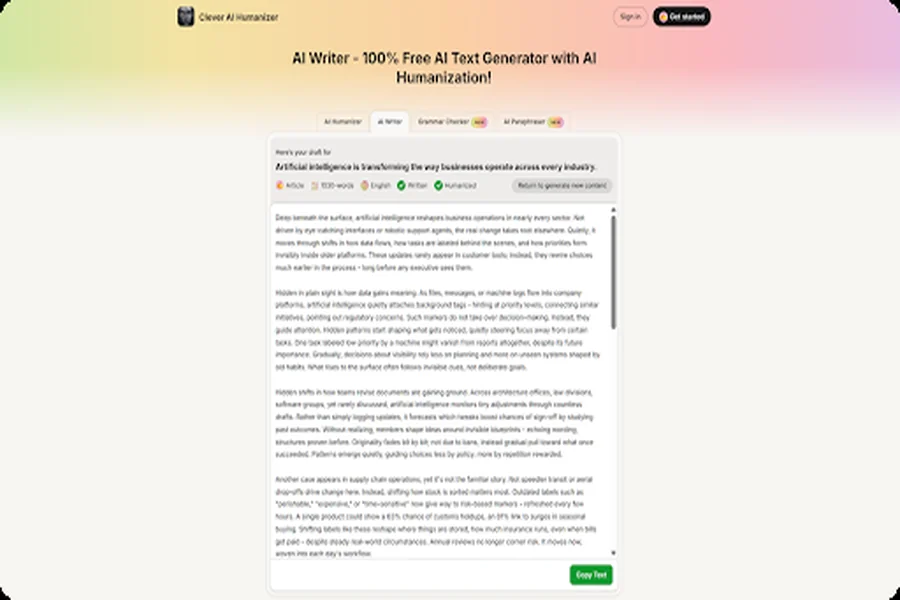
The AI Writer merges content generation and humanization into a single operation. You select a content format – Blog Post, Essay, or Article – supply a headline and a short topic summary, then set preferences for tone, language, and target length. When you click Generate and Humanize, the tool produces original AI-generated content and immediately passes it through the built-in humanization engine before the draft reaches your screen. The post-process step is built in, not added on.
The tool supports multiple languages and includes customizable length settings, which makes it usable for content teams that produce material across different formats and markets. For longer or more technical content, smaller and more focused prompts produce more reliable output.
One practical distinction between the AI Writer and the standalone humanizer: the AI Writer works best when you start from scratch. If you already have an AI-generated draft to fix, the humanizer in Step 3 is the right starting point. The AI Writer is the entry point when you want both steps – generation and humanization – in one workflow.
Grammar Checker
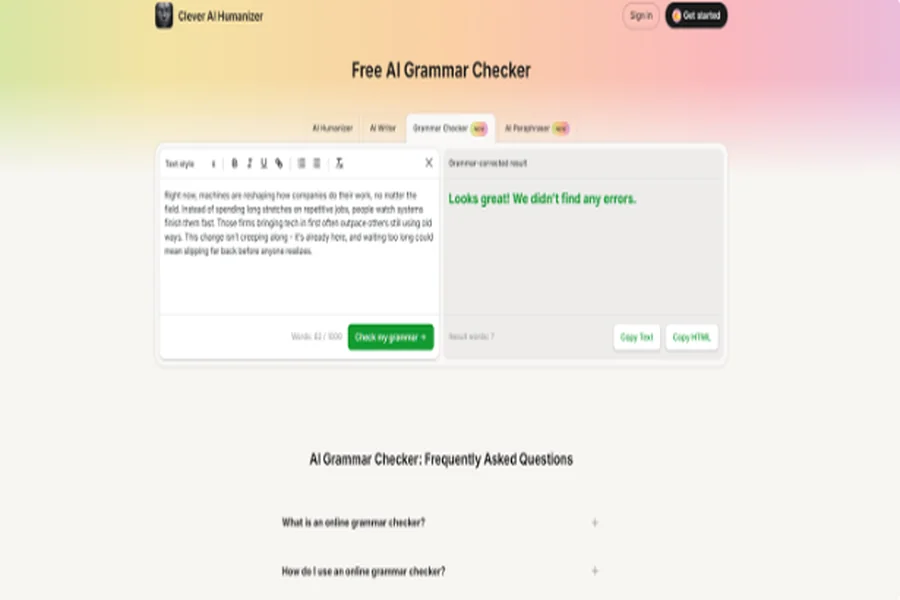
The Grammar Checker runs as the last step in the pipeline and addresses a specific problem that humanization creates. When you vary sentence length, split long clauses, or remove connective tissue to break AI rhythm, you occasionally introduce surface-level errors – a misplaced comma, an agreement issue, or a fragment that no longer connects cleanly to its neighbors. The grammar checker identifies and corrects these without putting back the uniform structure you just broke.
Beyond error correction, the tool also improves sentence structure and overall readability in a separate pass. It handles punctuation independently from grammar, and it works across multiple languages – relevant for teams that publish in more than one. It runs in mobile browsers without any app, which makes it accessible at any stage of the workflow, not just on a desktop.
The practical sequence is: humanize the full draft, paraphrase any sections that still sound repetitive, then run the grammar checker on the final output. Run it before humanization, and the humanizer will restructure sentences again, which may reintroduce issues the checker already fixed.
AI Paraphraser
The AI Paraphraser handles precision-level rewrites that a full humanization pass does not address. Where the humanizer works on rhythm and transitions across a passage, the paraphraser targets individual sentences – it adjusts synonym selection, clause order, and phrasing within defined limits, without disrupting the argument structure of the surrounding text. Writers who want to avoid AI detection at the sentence level find it most useful here.
It is most useful after the humanizer has processed a draft, and one or two sentences still cycle through the same synonym cluster. Rather than another full humanization pass – which would restructure more than you need – paste the specific sentence or short passage into the paraphraser and get a targeted rewrite at the word level.
Think of it as a finishing layer: the humanizer handles the passage, the paraphraser handles the sentence, and the grammar checker handles the surface. All three in sequence produce a final draft that reads cleanly at every level – rhythm, structure, and word choice.
How the Top Free AI Humanizer Tools Compare
We ran three different AI-generated texts through 24 tools and measured each output against ZeroGPT and GPTZero, plus a grammar quality check. The five tools below represent the clearest performance tiers from that test and cover the full range from the top AI humanizer options down to tools that barely move the needle. The average detection rate is the combined score across all three texts and both detectors. Lower is better.
| Tool | Price | Word Limit | Avg Detection | Avg Grammar | Free Plan | Best For |
| Clever AI Humanizer | Free | 200,000 / mo | 4.5% | 92.6 / 100 | Yes (registered) | Editorial teams, bloggers, high-volume content |
| Write Human AI | $18 / mo | 48,000 / mo | 14.1% | 95.0 / 100 | No | Paid users who want the best combined detection and grammar result |
| TwainGPT Humanizer | $10 / mo | 8,000 / mo | 20.4% | 95.3 / 100 | No | Budget-conscious writers who prioritize grammar quality |
| Undetectable AI | $19 / mo | 20,000 / mo | 34.4% | 87.6 / 100 | No | Users who recognize the brand, the grammar trade-off is notable |
| Stealth Writer AI | Free | 300,000 / mo | 51.9% | 89.3 / 100 | Yes | High-volume free users who accept inconsistent detection results |
A few things stand out in the data. Clever AI Humanizer is the only tool that averaged below 5% detection across all three test texts, and it is the only free option in that performance tier. The paid tools in the 34% to 52% range perform materially worse on detection than the free option, which means cost and effectiveness do not track together in this category.
Grammar score matters as a separate variable. A tool that clears a detector but degrades the writing quality is a poor trade. Undetectable AI’s 87.6 grammar average at $19 per month is a weaker result than Clever AI Humanizer’s 92.6 at no cost. The tools that score well on both metrics are Clever AI Humanizer, Write Human AI, and TwainGPT.
What to Do When the Score Does Not Drop
Most drafts clear the 20% threshold after one humanizer pass and one manual round. A small percentage do not, and the reason is almost always one of three things.
1.The passage is too short. Detectors work on statistical averages across a passage. A sentence or two does not give the model enough data to measure variation, so short fragments often score higher than longer counterparts even after humanization. If a flagged passage is under 80 words, add one or two sentences of natural context around it and recheck. The surrounding text changes the statistical profile.
2. The content is heavily technical or formal in nature. Technical writing uses a narrow vocabulary by necessity. Medical, legal, and engineering content often scores high on AI detection because the domain itself is low-variation – there are only so many ways to describe a procedure or a clause. In these cases, a score of 20% to 35% may be the realistic floor, not a sign that the process failed. Sentence-length variation is more effective here than vocabulary swaps, since the latter can introduce inaccuracies in technical content.
3. The humanizer changed the meaning. This happens occasionally on dense or jargon-heavy passages. The tool restructures syntax and may misread a technical phrase as a stylistic one. When the output says something different from the input, do not use it. Instead, run the passage through the paraphraser at Clever AI Humanizer for a sentence-level rewrite that stays closer to the original, or apply the manual checklist from Section 5 directly without a tool pass.
4. Related issues that often appear alongside humanization. Two problems tend to surface together when writers start to humanize AI content on a regular basis. The first is tonal inconsistency: the humanized sections read differently from the sections you wrote yourself or left untouched. After the merge, read the full piece at once and identify any paragraphs where the voice shifts noticeably. Those sections usually need one light manual pass to align them.
5. Over-humanization. Chasing 0% detection on every passage sometimes produces text that sounds stilted in the other direction – too casual, too hedged, or too fragmented. A score between 5% and 15% is the target range. If the text reads oddly after it hits 0%, return to the pre-humanized version and run a lighter pass with a formal tone preset instead.
FAQ
What is an AI humanizer, and how does it work?
An AI humanizer – sometimes called an AI-generated text humanizer – restructures AI-generated text to read more like natural human writing. It increases sentence-length variation, replaces predictable word choices with more direct alternatives, and removes the stock transitions that detectors weigh heavily. The tool changes the statistical profile of the text, not its meaning. The content says the same thing; it just no longer reads like a prediction engine.
What is the best free AI humanizer right now?
Based on our tests across 24 tools, Clever AI Humanizer is the strongest option for standard editorial use. It averaged a 4.5% detection rate across three different AI-generated texts – the lowest result in our comparison – and offers 200,000 words per month for registered users – the highest free limit we found.
How do we make AI text undetectable by detection tools?
Run the text through a humanizer first to fix rhythm and transitions, then apply a manual pass to add emotional micro-cues, vary sentence length, and cut remaining stock connectors. Recheck with ZeroGPT or Originality.ai after each pass. Most content drops below 20% detection after one tool pass plus one manual pass. The method works because it targets the structural patterns all major detectors share, not the quirks of any single platform.
Can we bypass AI detectors without changing the meaning?
Yes. The changes that lower detection scores alter form, not meaning. Varied sentence length, more direct word choices, and removed filler transitions all say the same thing in a tighter or more varied structure. In practice, humanized text is often clearer than the original AI output because it strips out the redundancy that AI builds in for fluency.
Final Thoughts
We want to leave you with a clear picture of what we found across 24 tools and hundreds of test runs. Most humanizers solve one problem and stop there. Clever AI Humanizer builds the entire workflow into one place – the humanizer, the AI Writer, the Paraphraser, and the Grammar Checker – all free, all integrated, and each one designed to hand off cleanly to the next. That combination is what separates a single tool from a real writing ecosystem, and it is why the detection results we recorded are so far ahead of the paid competition.
Two things to keep in mind before you post. Always save the original AI-generated draft before you run it through the humanizer – if the output drifts from your meaning, you need the source to recover it fast. And run the final draft through a readability checker before publishing. A humanized text that scores above Grade 12 often still carries AI-style complexity even after detection scores drop. Simplicity and a human voice move together – and that, more than any score on any detector, is what keeps readers coming back.

